---
title: How to Configure Genesys to Display Agent Avatars
description: To ensure that agent avatars are visible to customers in Genesys, several configuration steps must be completed. The requirements differ slightly between web chat / Messenger and audio calls.
---
[ ](https://kb.trueengage.com/?hsLang=en)
[Home](https://trueengage.com/?hsLang=en) [Docs](https://kb.trueengage.com/genesys-cloud?hsLang=en) [Pricing](https://trueengage.com/genesys-cloud/pricing?hsLang=en)
[Sign In](https://management.trueengage.com/login) [Install from AppFoundry](https://appfoundry.genesys.com/filter/genesyscloud/listing/d3d5011e-668b-411c-bc8d-512e3023b359) [Book a Demo](https://trueengage.com/genesys-cloud/demo?hsLang=en)


[Home](https://trueengage.com/?hsLang=en) [Docs](https://kb.trueengage.com/genesys-cloud?hsLang=en) [Pricing](https://trueengage.com/genesys-cloud/pricing?hsLang=en)
[Sign In](https://management.trueengage.com/login) [Install from AppFoundry](https://appfoundry.genesys.com/filter/genesyscloud/listing/d3d5011e-668b-411c-bc8d-512e3023b359) [Book a Demo](https://trueengage.com/genesys-cloud/demo?hsLang=en)
[Skip to content](https://kb.trueengage.com/genesys-cloud/how-to-configure-genesys-to-display-agent-avatars#main-content)
- [Tickets](https://support.trueengage.com/tickets-view)
- [Sign out](https://support.trueengage.com/_hcms/mem/logout)
Open main navigation
Close main navigation
- [Tickets](https://support.trueengage.com/tickets-view)
- [Sign out](https://support.trueengage.com/_hcms/mem/logout)
How can we help you?
- There are no suggestions because the search field is empty.
1. [Knowledge Base](https://kb.trueengage.com/genesys-cloud?hsLang=en)
2. [FAQs](https://kb.trueengage.com/genesys-cloud/faqs?hsLang=en)
# How to Configure Genesys to Display Agent Avatars
### To ensure that agent avatars are visible to customers in widget, several configuration steps must be completed. The requirements differ slightly between **webMessenger** and **audio calls**. **1. Agent Avatars in webMessenger**
To display agent avatars in web chat or Messenger, make sure the following settings are in place:
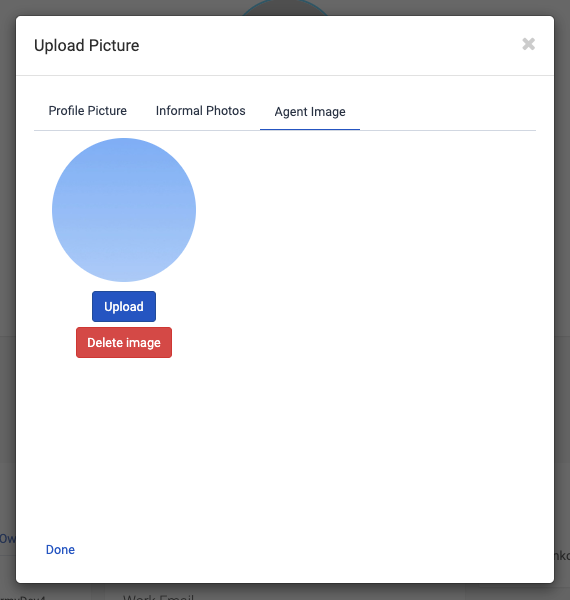
#### **1.1 Set the Agent Image**
- The agent must have an image assigned in their profile.
- **Important:** The image must be set as **Agent Image**, *not* as *Profile Picture*.
(Only the Agent Image is used by Genesys for customer-facing channels.)
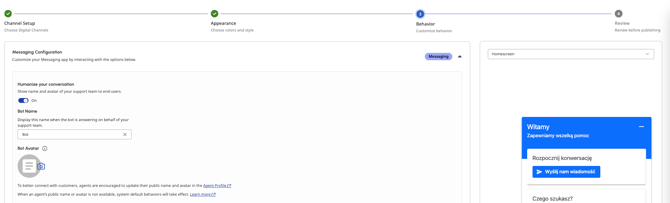
#### **1.2 Enable “Humanize Your Conversation”**
- Navigate to the **Messenger Configuration** used by the relevant **Messenger Deployment**.
- In the **Behavior** section, enable the option **Humanize your conversation**.
- This setting allows Messenger to display agent avatars to end users.
---
### **2. Agent Avatars in Audio Calls**
To show agent avatars during audio interactions, ensure the following prerequisites are met:
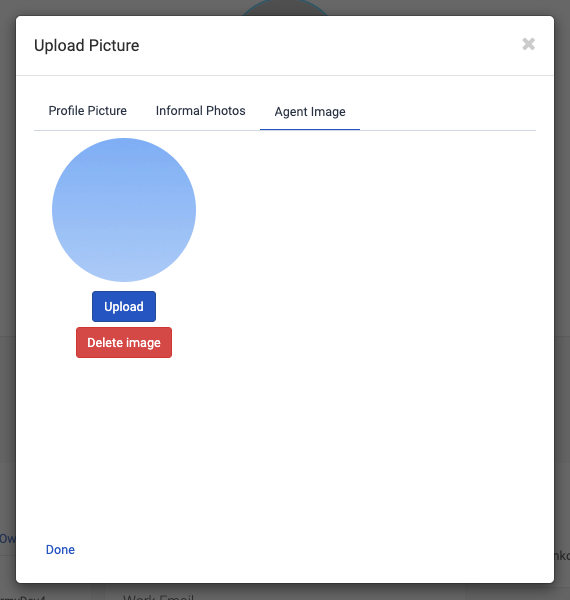
#### **2.1 Set the Agent Image**
- As with chat, the agent must have an image assigned as **Agent Image** (not Profile Picture).
---
If all the above conditions are met, agent avatars should display correctly across the relevant Genesys channels.
- [Getting Started](https://kb.trueengage.com/genesys-cloud/getting-started?hsLang=en)
- [Installation & Setup](https://kb.trueengage.com/genesys-cloud/installation-setup?hsLang=en)
- [User Guide](https://kb.trueengage.com/genesys-cloud/user-guide?hsLang=en#main-content)
- [Contact Channels](https://kb.trueengage.com/genesys-cloud/user-guide?hsLang=en#contact-channels)
- [Features](https://kb.trueengage.com/genesys-cloud/features?hsLang=en)
- [FAQs](https://kb.trueengage.com/genesys-cloud/faqs?hsLang=en)
- [Troubleshooting](https://kb.trueengage.com/genesys-cloud/troubleshooting?hsLang=en)
- [Administration & Billing](https://kb.trueengage.com/genesys-cloud/administration-billing?hsLang=en)
- [Integrations & API's](https://kb.trueengage.com/genesys-cloud/integrations-apis?hsLang=en)
- [Architecture & Security](https://kb.trueengage.com/genesys-cloud/architecture-security?hsLang=en)
- [Legal](https://kb.trueengage.com/genesys-cloud/legal?hsLang=en)
- [Interaction Routing & Availability](https://kb.trueengage.com/genesys-cloud/interaction-routing-availability?hsLang=en)
[%20copy.png?width=440&height=36&name=logo%20(3)%20copy.png "logo (3) copy")](https://www.trueengage.com?hsLang=en)
[mailto:email@email.com](mailto:email@email.com)