

Recording of a chat upgraded to WebRTC is achieved by adding a third call leg that:
-
dials a dedicated phone number,
-
this number is assigned to an empty queue with recording enabled in Genesys Cloud.
As a result:
-
Genesys Cloud generates a standard call recording,
-
the recording is immediately available in Genesys,
-
no agent is involved in handling the technical recording call.
Dedicated Recording Number
A dedicated recording phone number is automatically created during the TrueEngage account setup.
You can:
-
find this number in TrueEngage → Settings, or
-
contact TrueEngage Support to retrieve or configure the number.
This number must exist in Genesys Cloud as a DID that is not assigned to any agents.
Step 1: Create an Inbound Call Flow in Genesys Architect
-
Go to Genesys Cloud → Architect
-
Create a new Inbound Call Flow
-
Name the flow:
TrueEngage_UpgradeRecording
Flow Configuration
After creating the flow:
-
Remove the following default components:
-
Initial Greeting
-
Menu Prompt
-
-
Expand Menu Options and set:
-
Number of times to repeat menu:
10 -
Menu selection timeout:
60 seconds
-
-
Click Publish to save and activate the flow.
This configuration ensures the call stays active for recording purposes without routing to any agent.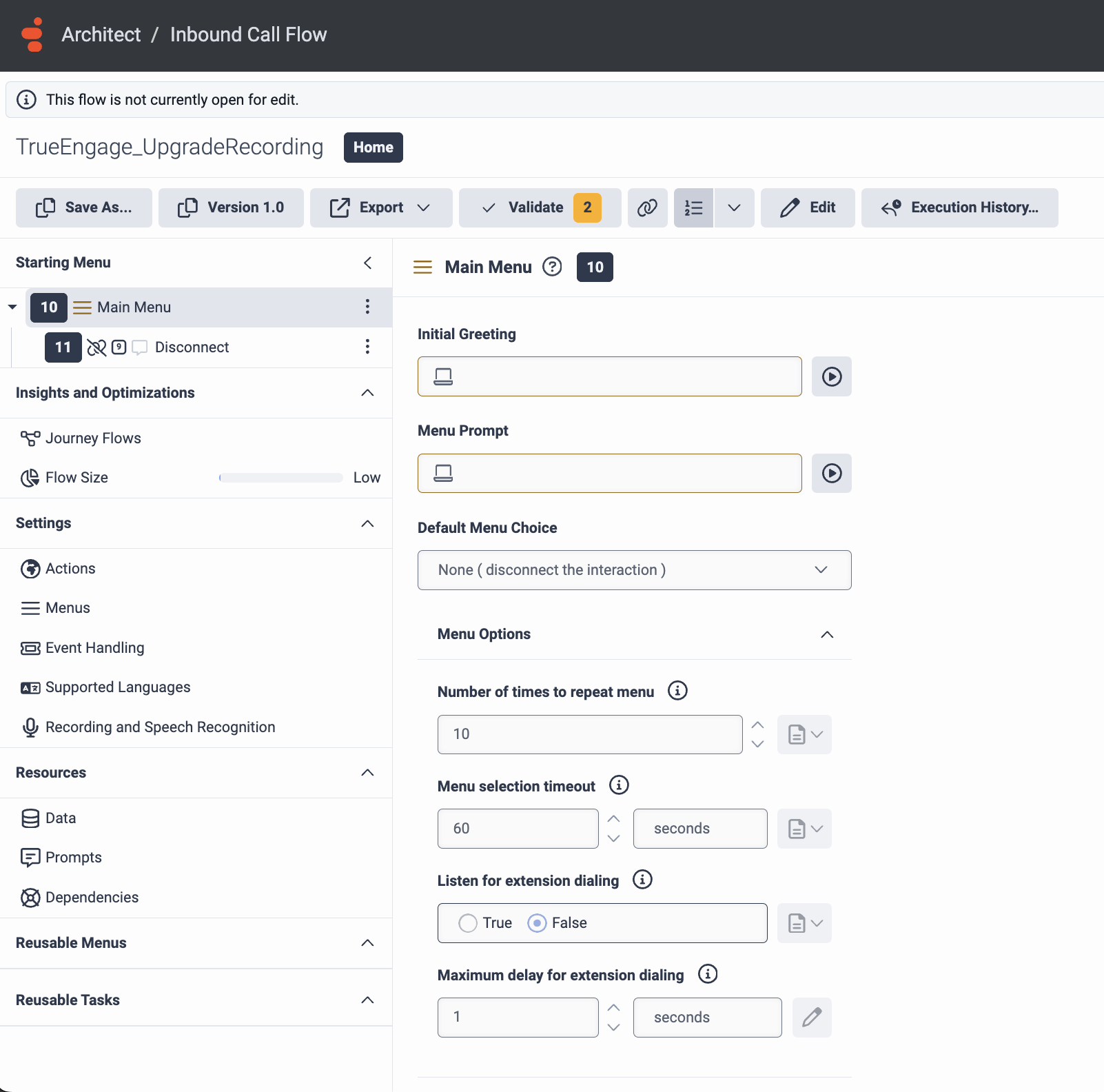
Step 2: Create Call Routing for the Recording Number
-
Go to Genesys Cloud Admin
-
Navigate to Digital & Telephony → Call Routing
-
Create a new Call Route
-
Name the route:
TrueEngage_UpgradeRecording
Call Route Settings
-
Phone Number:
Select the dedicated recording number (it should already exist as an unused DID). -
Route To:
Select the inbound call flowTrueEngage_UpgradeRecording.
Save the configuration.
Interaction Linking and Metadata
When a chat interaction is upgraded to an audio/video (WebRTC) session, Genesys Cloud creates a new interaction for the upgraded call. The relationship between the original chat interaction and the recorded call interaction is exposed via interaction metadata.
Original Chat Interaction
In the original chat interaction, the participantData object contains a reference to the upgraded interaction:
-
Key:
upgradeInteractionId -
Value: ID of the newly created audio/video (WebRTC) interaction
This allows the original chat session to be programmatically linked to its upgraded call.
Recording (Call) Interaction
In the interaction created for recording (the third call leg routed to the recording flow), the metadata contains a reference back to the original interaction:
-
Key:
base_interaction_id -
Value: ID of the original chat interaction
This ensures that:
-
the recording interaction can be correlated with the original chat,
-
reporting and post-processing can correctly associate chat and call data.
Summary
| Interaction Type | Metadata Key | Purpose |
|---|---|---|
| Original Chat | upgradeInteractionId |
Links to the upgraded WebRTC interaction |
| Recording / Call | base_interaction_id |
Links back to the original chat interaction |
This bidirectional linkage enables reliable correlation between the chat, the upgraded audio/video session, and the resulting recording in Genesys Cloud.
Result
Once the configuration is complete:
-
every chat upgraded to WebRTC automatically creates a third call leg,
-
the call is routed to a non-agent flow with recording enabled,
-
Agent and Visitor audio/video is recorded together,
-
the recording is immediately available in Genesys Cloud, without impacting agent availability.