

How the Integration Works
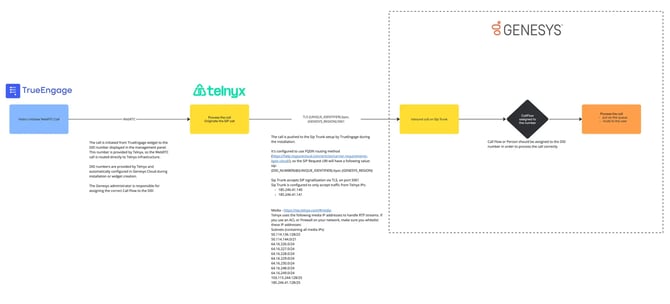
- Visitor Initiates WebRTC Call:
- A website visitor initiates a call from the TrueEngage widget.
- The call is routed through WebRTC to a dedicated DID (Direct Inward Dialing) number.
- Telnyx provides the DID and acts as the WebRTC infrastructure provider, ensuring reliable voice communication.
- Processing the Call with Telnyx:
- The WebRTC call is routed to Telnyx, where it is converted into a SIP call.
- SIP Trunking: TrueEngage automatically configures a SIP trunk during installation, which connects Telnyx and Genesys Cloud. The call is pushed to the SIP trunk for further processing.
- Inbound Call Routing to Genesys Cloud:
- Genesys Cloud receives the call through the SIP trunk, with routing determined by the DID number assigned to the call.
- The Genesys Cloud administrator assigns the appropriate Call Flow to the DID, ensuring that the call is directed to the right queue or agent.
- Call Handling in Genesys Cloud:
- Once the call reaches Genesys Cloud, the assigned Call Flow processes it by either placing the caller in a queue or routing them to a specified agent.
- The administrator configures Genesys to ensure the correct routing and handling of the call.
Technical Configuration
- SIP Trunk Setup:
- The SIP trunk is set up in Genesys Cloud during the installation of the TrueEngage widget.
- The trunk uses FQDN routing provided by Telnyx and is configured with TLS on port 5061 for secure communication.
- DID Configuration:
- The DID numbers are provisioned by Telnyx and are automatically configured in Genesys Cloud when setting up the widget.
- Each DID has a specific Call Flow assigned by the Genesys administrator.
- Call Flow Assignment:
- It's critical for the Genesys administrator to assign the correct Call Flow to each DID number to ensure calls are routed correctly.
Security & Network Requirements
- TLS and Media Stream Security:
- SIP communication between Telnyx and Genesys Cloud is secured using TLS on port 5061.
- RTP media streams are handled via Telnyx Media Servers, and specific IP addresses need to be whitelisted to ensure proper communication.
- Required IP Addresses:
- The following Telnyx IP addresses must be whitelisted for secure communication and media handling:
-
Sip Trunk:
185.246.41.140185.246.41.141
Media:
- 36.255.198.128/25
- 50.114.136.128/25
- 50.114.144.0/21
- 64.16.226.0/24
- 64.16.227.0/24
- 64.16.228.0/24
- 64.16.229.0/24
- 64.16.230.0/24
- 64.16.248.0/24
- 64.16.249.0/24
- 103.115.244.128/25
- 185.246.41.128/25
Additional Information
For more detailed setup and configuration instructions for your Genesys Cloud and TrueEngage integration, please refer to the relevant documentation: