

Immediate and scheduled callbacks at a glance
| Immediate callback | Scheduled callback | |
|---|---|---|
| Visitor selects | Call me back now | Call me back later |
| When the call is requested | As soon as possible | At a date and time the visitor chooses from the available slots |
| Visitor provides | Phone number and any configured form fields | Date, time slot, phone number, and any configured form fields |
| Best for | Visitors who are ready to talk now | Visitors who want to plan the conversation |
You can offer immediate callbacks, scheduled callbacks, or both in the same widget.
How a callback request reaches an agent
- The visitor submits a request in the TrueEngage widget.
- TrueEngage creates the callback in Genesys Cloud.
- Genesys Cloud routes the callback and places the call to the customer, based on your contact center configuration.
TrueEngage only creates the callback. It is not involved in the call itself. When the call actually happens depends on your queue, your routing configuration, and agent availability. Neither type of callback guarantees an exact connection time.
Immediate callbacks
An immediate callback is for visitors who want to speak with your team now. Under Call me back now, the visitor selects their country code, enters their phone number, and selects Request a call. They don’t choose a time slot.
In this example, the widget shows an Available indicator. Below it, Call me back later gives visitors the option to Schedule a call instead.
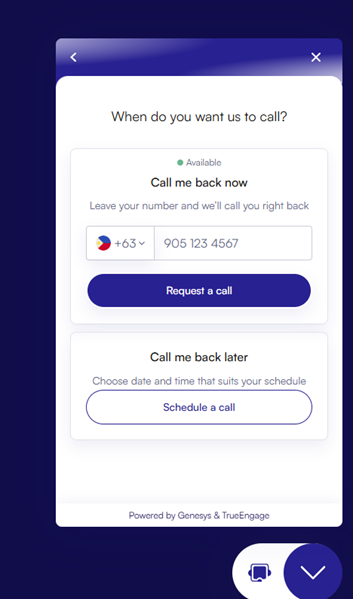
Visitor view offering an immediate or a scheduled callback
Example: A customer reading about a product has a question and is ready to talk. They leave their number and request an immediate callback.
Your administrator can limit when immediate callbacks are offered, using two optional checks in the routing settings:
- Schedule group: offer immediate callbacks only during opening hours
- Estimated waiting time: offer immediate callbacks only when the queue’s wait time is acceptable
Set these to reflect when your team can actually handle requests.
Scheduled callbacks
A scheduled callback lets visitors book a call for later. After selecting Schedule a call, the visitor:
- selects an available date
- selects a time slot under Morning, Afternoon, or Evening
- enters their phone number
- selects Request a call
The dates and slots offered depend on your scheduling configuration. In this example, times are shown in 12-hour (AM/PM) format.
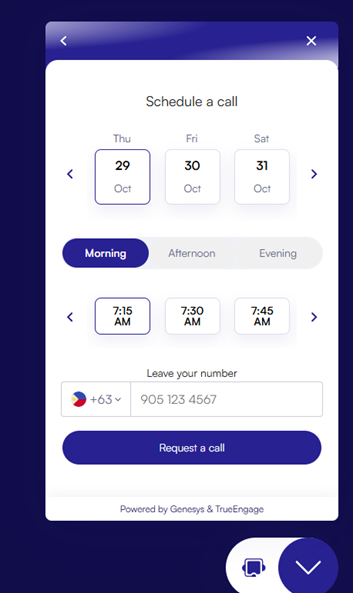
Visitor view for choosing a callback date and time and entering a phone number.
Example: A customer wants to discuss a service but is busy right now. They book a slot for later in the week, and Genesys Cloud handles the callback at that time.
Customer information for the agent
You can add a pre-interaction form to collect more details before the request is sent, such as the visitor’s name or reason for contact. If a form is configured, the agent can see the submitted details in the TrueEngage Visitor Journey app in Genesys Cloud. Ask only for the information you need to handle the request.
Set up and test your callback widget
To set up the channel and routing, follow How to Build and Test Your First Callback Request Widget. Before you publish the widget on your website:
- test each callback option you plan to offer
- check that each request reaches the right queue
- check that the customer actually receives the call