

Overview
TrueEngage scheduled callbacks show time slots built from the opening hours of a Genesys Cloud schedule group. If visitors see no slots, or fewer than you expect, the cause is almost always the schedule group or one of the slot settings in TrueEngage Routing. Go through the checks below in order. To set up callbacks from the start, see How to set up web callback requests for Genesys Cloud.
Check 1: The callback mode allows scheduled callbacks
In the TrueEngage management panel, open your deployment and go to Settings, then the Callback section. If Callback mode is Immediate, the widget only offers a call now and never shows slots. Choose Scheduled or Scheduled and Immediate.
Check 2: The schedule group has open hours
- In Routing, under Scheduled Callback, note the Schedule group.
- In Genesys Cloud, open that schedule group and check that it has an open schedule for the coming days. Closed and holiday schedules override open ones, so they remove slots for that time. See Operating schedule groups in the Genesys Cloud Resource Center.
- Check the time zone of the schedule group. Slots are shown in the visitor's own time zone, so a wrong time zone moves the slots.
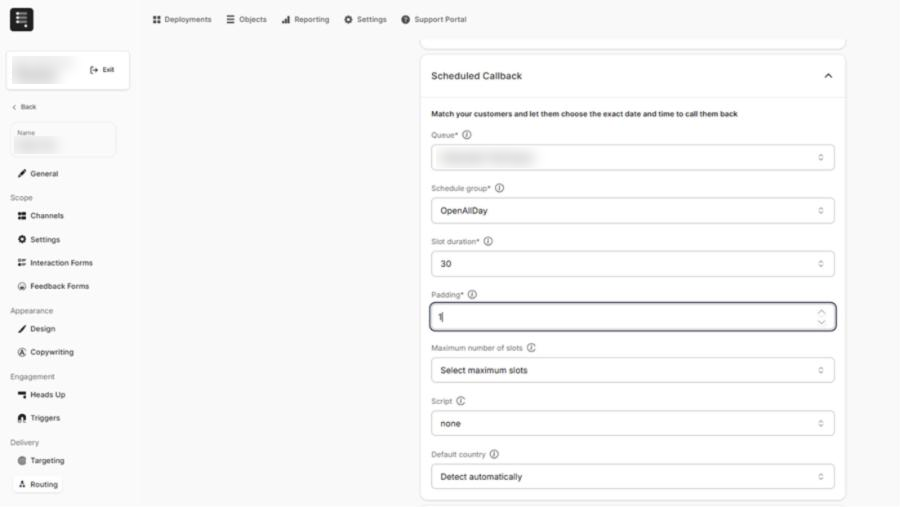
Check 3: Padding doesn't push slots past closing time
Padding is the number of slots skipped before the first available callback time. With a slot duration of 30 minutes and a padding of 4, the first slot is two hours away. Late in the day, that can push every remaining slot past closing time. Lower the padding, or test earlier in the day.
Check 4: Slot duration and maximum number of slots
- Slot duration sets the length of each slot. A long slot duration leaves fewer slots in a short opening window.
- Maximum number of slots limits how many slots the visitor sees. If it is set low, visitors see only a few slots.
Why is "Call me back now" missing?
This is about immediate callbacks, not slots. In Routing, under Immediate Callback:
- With Check schedule group selected, immediate callbacks are offered only during opening hours.
- With Check estimated waiting time selected, immediate callbacks are offered only when the queue's wait time is acceptable. When the wait is too long, the widget shows only scheduled callbacks.
Still no slots?
Test again with the Test Page button in the management panel. If slots still don't show, open a ticket in the Support Portal from the management panel and include the deployment name and the schedule group name.